

Scavenger hunt ideas for youth groups & church camps

Friends photographing different items at a city plaza during a scavenger hunt

A scavenger hunt is a game in which players race to find, photograph, or document a list of tasks within a time limit. The player with the most points at the end wins.

Modern scavenger hunts are no longer about scribbled paper lists. They're played from a phone, scored automatically, and run anywhere — at the office, on a road trip, at a wedding reception, or across an entire convention floor.

The core ingredients

Every scavenger hunt has the same building blocks, regardless of the venue:

  • A list of tasks. "Photograph something red," "find a colleague who can juggle," "take the oldest selfie in the park."
  • Points. Harder or rarer tasks score more.
  • A time limit. An hour, an evening, or several days — clarity matters more than length.
  • A way to verify completion. Most tasks ask for a photo as proof. Tasks that don't require a photo are trust-based and reviewed by the organizer.
  • A leaderboard. What turns it from a checklist into a competition.

Common types

Scavenger hunts come in several recognizable formats:

  • Photo scavenger hunt — players submit a photograph of each task. The most flexible format and the easiest to verify on a phone.
  • Treasure hunt — players follow a chain of clue-style tasks that lead to a final reveal. Beloved at children's parties and corporate offsites.
  • Themed scavenger hunt — tasks built around a specific occasion: bachelorette, birthday, holiday, or company milestone.
  • Digital scavenger hunt — entirely online; players complete creative photo and challenge tasks from home and post them to a shared leaderboard. Works for fully remote teams.

Where they shine

Scavenger hunts are a quiet workhorse format. They scale from 5 players to several hundred, work indoors and outdoors, and require nothing more than a smartphone. They're a fixture at team-building events, corporate conferences and trade shows, birthdays and wedding receptions, and family trips.

The reason is simple: they replace passive moments — small talk, queuing, downtime between sessions — with structured fun that produces shareable photos and stories.

Scavenger hunt vs. treasure hunt

The two terms are often used interchangeably, and for casual events the distinction doesn't matter. Strictly speaking, a treasure hunt ends with players finding a single hidden treasure or item, usually by following a chain of clues. A scavenger hunt rewards completing the most items from an open list — there's no single "treasure" at the end, just the highest score.

How to run one

The easiest way to run a scavenger hunt today is from a mobile app. Players join with a short game code, complete tasks at their own pace, and the app handles scoring and the leaderboard automatically.

Read next:

If you want to try a scavenger hunt for your next event, EventBattle gives you a free game for up to three players — enough to test the format with your closest collaborators before scaling up.

Organizer's desk with task list, sticky notes, and a phone showing a scavenger hunt setup

Making a great scavenger hunt isn't about picking 50 random tasks. It's about pacing, theme, and the moment of the reveal. Here's the process that works whether you're organizing a team-building event, a wedding game, or a road trip challenge.

1. Decide on the task style

EventBattle tasks have three switches that shape the game:

  • Photo required or not. Photo-required tasks ("photograph something blue") give you proof you can review later. Photo-optional tasks ("compliment a stranger") are trust-based and faster to play.
  • One-shot or repeatable. Set a repetitions limit per task. "Photograph the bride" — one shot. "Compliment a stranger" — repeatable up to 5 times for stacking points.
  • Cooldown between repetitions. For repeatable tasks, a cooldown (in seconds) prevents one player from spamming the same prompt. 60–300 seconds works for most games.

2. Set the duration

Match the duration to the energy of your event. As a rough guide:

  • 60–90 minutes for a focused break inside a longer day.
  • 2–6 hours for a wedding reception or birthday party arc.
  • 1–3 days for a corporate retreat, conference, or off-site.
  • A full vacation for a family trip game that travels with you.

3. Write 15–30 tasks

The number of tasks matters more than the difficulty. With fewer than 10, players finish too quickly and the leaderboard doesn't differentiate them. With more than 40, players give up.

Mix three difficulty bands:

  • Quick wins (5–10 points) — anyone can do them in seconds. They build momentum.
  • Standard tasks (15–30 points) — the meat of the game.
  • Stretch tasks (50+ points) — only the most committed players will complete them. They decide the leaderboard.

4. Add personality

Generic tasks ("photograph something red") are forgettable. Personal tasks ("photograph something the bride hates") are the moments people share afterwards. The most memorable scavenger hunts have:

  • Inside jokes only your group will understand.
  • Tasks that reference real people in the room.
  • Venue-specific prompts ("find the only painting on the third floor with a cat in it").
  • Creative restrictions ("recreate this iconic movie scene with three colleagues in the photo").

5. Test before you ship

Run through the task list yourself before sharing the game code. You'll catch:

  • Tasks that turn out to be impossible at the venue.
  • Wording that's ambiguous (and will spawn a flood of "wait, does this count?" questions).
  • Point values that are out of balance.
  • Cooldown values that are too short (one player ends up spamming) or too long (nobody bothers to repeat).

6. Deliver the experience, not just the game

The strongest scavenger hunts have three moments stitched in:

  • The kickoff. A short intro that explains the rules and energy. Don't rush it.
  • The mid-game pulse. Show the leaderboard halfway through to spike competition.
  • The reveal. Project the final leaderboard, hand out a small prize, and screen the best photos.

Use a tool that handles the boring parts

Manual scoring of a 30-task scavenger hunt for 20 players is brutal. EventBattle automates the leaderboard, photo collection, repetitions, and cooldowns so you can focus on the experience. Teams, corporate events, celebrations, and trips all use the same engine.

Read next:

Whiteboard timeline for planning a scavenger hunt event

Planning a scavenger hunt is mostly logistics. Get the planning right and the game runs itself; skip it and the day will be filled with "wait, what's the rule?" questions. Here's the checklist that good organizers run through before the game begins.

1. Define the goal

"Have fun" isn't a goal — it's the result. A goal is more specific:

  • Break the ice between two teams that don't usually work together.
  • Get attendees to walk a trade show floor and visit specific booths.
  • Give wedding guests something to do between dinner and dancing.
  • Keep a road trip from collapsing into screens-and-headphones.

Write it down. The goal will resolve every "should I include this task?" question for you.

2. Set the parameters

Lock down the four numbers that shape every other decision:

  • Players. How many people will be playing? Each player joins with their own nickname and has their own row on the leaderboard. If you want a "team" feel, see the team-play workaround below.
  • Duration. 60 minutes? An afternoon? Three days?
  • Venue. One room? A whole campus? A city? Mobile?
  • Budget. Most scavenger hunts cost almost nothing; a small prize budget ($20–100) makes the win meaningful.

3. Build the task list

For a 60-minute game with 5–20 players, aim for 20 tasks. Mix easy momentum-builders with stretch challenges that decide the leaderboard. See how to make a scavenger hunt for the full task-design process.

4. Decide on team play

EventBattle scores by nickname, not by team — but team play still works as a workaround. Pick one of these approaches:

  • One device per team. Three friends share a phone with one nickname. Photo collaboration, single leaderboard entry. Simplest option.
  • Solo with informal teams. Each person plays under their own nickname; teams are loose alliances. Keeps the leaderboard granular while letting people coordinate.

Decide which one before the kickoff so the rules are clear.

5. Sort the logistics

Run through this list two days before the event:

  • Phones charged. Remind players the night before. A scavenger hunt with a 30%-battery problem is a dead game.
  • WiFi or data plan. Photos upload over the network — if you're inside a venue with no signal, photos will queue and submissions will lag.
  • Game code shared. Print it on a sign or include it in a calendar invite — never rely on people typing in the wrong characters.
  • Prizes ready. Even a cheap one. The reveal is empty without it.
  • Backup plan. What if the venue staff stops you from running a task? What if it rains? Have one fallback task per high-risk situation.

6. Brief the players

Take 90 seconds at the start to explain:

  • How to join (the 4-character game code).
  • The rules (photo proof? team play? time limit? repeatable tasks and cooldowns?).
  • The boundaries (where can / can't they go).
  • The prize.

Skip this and the first 10 minutes of the game will be people asking each other for instructions.

7. Run the day

Watch the leaderboard, but don't moderate too early. Most "is this allowed?" questions resolve themselves once the points start flowing. Mid-game, project the leaderboard if you can — it doubles the energy in the final third.

8. Close it strong

The reveal is the moment people remember. Show the top three on a screen, name them, hand the prize over in person. Then post the best photos to your team channel, the wedding album, or your conference recap email. The game becomes content.

Read next:

Hand holding a phone showing a scavenger hunt game setup wizard

Setting up a scavenger hunt used to mean printing checklists, hiring a host, and refereeing arguments about whether a fuzzy photo of a duck counts. Today the setup is a five-minute job in a mobile app. Here's how to do it the modern way.

App vs. paper

You can still run a paper scavenger hunt, and for groups of 4 or fewer it's fine. Anything bigger and a mobile app saves you in three places:

  • Scoring — the app totals points automatically, so there's no end-of-game spreadsheet panic.
  • Photo verification — players upload proof from their phone; you don't need to chase them.
  • Live leaderboard — visible to all players in real time, which is what makes it competitive instead of polite.

The five steps in EventBattle

The setup wizard takes you through these in order:

1. Name your game

Make it specific to the occasion: "Acme Off-site 2026" or "Sarah's 30th Birthday Hunt." Players will see this when they join, and it sets the tone.

2. Pick a preset (or build your own)

EventBattle ships with ready-made task presets. Pick the closest match — you can edit any task afterwards. If none of them fit, choose "Build your own" and start from a blank list.

3. Customize the tasks

Each task has the following fields:

  • Title and description — the prompt players see ("photograph something blue").
  • Points — 10–500 depending on difficulty.
  • Photo required — toggle on to demand photo proof, off for trust-based tasks.
  • Repetitions limit — how many times one player can complete the task. Leave empty for unlimited.
  • Cooldown — seconds a player must wait between repetitions. Prevents point-spamming on repeatable tasks.
  • Sort order — drag to reorder; the first task in the list is the first thing players see.

4. Set the schedule

Pick the start and end date and time, and your timezone. For multi-day games, set the hour each game day closes — the day's ranking locks there, so overnight submissions count toward the next day.

5. Brand and publish

Upload your logo, set a cover image, and the app generates a 4-character access code (e.g. EPIC). On the Battle plan you can pick your own code so it's easier to share verbally.

Player onboarding

Once published, players install the EventBattle app, enter the code, pick a nickname, and they're in. No accounts, no email confirmation — the friction is intentionally low.

Common gotchas

  • Wrong timezone. If your players are in different cities, set the timezone to where the game physically happens. The leaderboard timestamps follow that.
  • Tasks that need WiFi. If you ask players to upload a high-resolution photo and they're in a basement, expect grumbling. Test the venue's signal before publishing.
  • Too many tasks. 50 tasks for a 60-minute game means 30 tasks no one ever sees. Trim ruthlessly.
  • Cooldown set to zero on repeatable tasks. One determined player can rack up 1000 points in 5 minutes. Always set a cooldown — 60 seconds minimum.

Test it on yourself

Before sharing the code, run through the first 5 tasks yourself in the app. You'll catch ambiguous wording and broken point values that look fine on the wizard screen.

Read next:

Two friends reacting to a just-taken scavenger hunt photo

Playing a scavenger hunt is simple, but a few habits separate the players who finish near the top from the ones who finish frustrated. Whether your hunt is a corporate offsite, a wedding reception, or a family road trip game, the same fundamentals apply.

Joining the game

Modern scavenger hunts start with a short game code. In EventBattle:

  • Install the EventBattle app from the App Store, Google Play, or Huawei AppGallery.
  • Enter the 4-character game code shared by the organizer.
  • Pick a nickname your group will recognize.
  • Wait for the game to open at the scheduled start time.

No accounts, no email confirmation — you're in within 30 seconds of installing.

The basic rules

  • Tasks have point values. Higher = harder.
  • Photo-required tasks need proof. Submit a photo from inside the app; it's stored against your name on the leaderboard.
  • Photo-optional tasks are trust-based. You self-report completion; the organizer can review or flag if needed.
  • Some tasks repeat — within limits. A repeatable task may have a maximum number of completions and a cooldown timer between attempts. The app shows the next available time.
  • The leaderboard updates live, so you can see whether you're winning, losing, or in striking distance.
  • The clock is real. When the timer hits zero, no more submissions count.

Strategy for beginners

If this is your first hunt, three habits help:

  • Knock out the quick wins first. Five 10-point tasks done in 10 minutes feel better than one 50-point task that took an hour.
  • Read the whole list before you start. Some tasks are easier to combine ("photo of three things on the menu" + "photo with a stranger" = one shot if the stranger is at the next table).
  • Save one stretch task for the last 15 minutes. Final-stretch points often decide the leaderboard, and the people who left early can't catch you.

Strategy for the leaderboard

Once you've played a few games, the meta-game shows up:

  • Watch the leaderboard mid-game. If you're 200 points behind first place with 15 minutes left, focus on stretch tasks. If you're 50 ahead, defend by stacking low-risk wins.
  • Stack repeatable tasks. Find the task with the shortest cooldown and the highest per-completion points. While other players hunt for one-shot tasks, you grind a steady score in the background.
  • Don't argue with task wording. Submit your interpretation; if it's flagged, move on. You'll lose more time arguing than completing the next task.
  • Photo quality matters. A blurry, half-lit photo can be flagged as not matching the task. Take two seconds, get a clean shot.

Etiquette

  • Don't sabotage other players' photos.
  • Don't argue with venue staff over a task — pick a different one.
  • If you're at a wedding, bachelorette, or kid's party, remember the game is the side dish, not the main course.

Playing as a team

EventBattle scores per nickname, not per team — but team play works fine as a workaround:

  • One device, one nickname, one entry on the leaderboard. Three teammates share a phone and split the work: one runs the photos, one reads the task list, one handles the social tasks ("interview a stranger") that need confidence more than sprint speed.
  • Several devices, informal alliance. Each person plays under their own nickname and you compare scores afterwards. Best when you also want a personal leaderboard.

Whichever you pick, agree on it before the game starts — mid-game switching gets messy.

Want to organize your own?

Two players in different cities playing the same digital scavenger hunt game

A digital scavenger hunt is the same game your grandparents played at summer camp, except the checklist lives on your phone, players upload photos for proof, and the leaderboard updates live. The format works for fully remote teams, hybrid groups, and in-person events that just don't want to mess with paper.

Why digital wins

  • No printing. No checklists, no scoring spreadsheets, no end-of-game arguments about whether a photo counts.
  • Players can be anywhere. A remote team in five cities competes on the same leaderboard as if they were in one room.
  • Automatic scoring. The app handles points, repetitions, and cooldowns; the organizer focuses on the experience.
  • Photos become content. After the game, the photos are already digital and shareable — perfect for a recap email or a wedding album.

Pick a platform

The right platform depends on your group:

  • EventBattle — designed for groups from 3 to several hundred, with ready-made task presets. Free up to 3 players.
  • Custom Google Form — possible if you want maximum control, but you'll lose the live leaderboard and have to score by hand.
  • Generic survey tools — Typeform, Slack polls, etc. Workable for a 5-task quick game; clunky beyond that.

For anything serious, use a dedicated scavenger hunt app.

Build your task list

Digital-friendly tasks lean on three categories — and EventBattle's task fields (photo required, repetitions limit, cooldown) shape how each one plays:

  • Photo tasks. "Best home-office setup," "show us your pet," "recreate this iconic movie scene." Set photo required on; one-shot or repeatable as you prefer.
  • Creative challenges. "30-second TikTok-style intro," "draw your team mascot," "record a 10-second song about Friday." Photo-required, one-shot, high points.
  • Themed knowledge prompts. "Photograph a slide that surprised you in today's keynote," "screenshot your favourite line of code we shipped this quarter." Players self-photograph their answer; the organizer reviews.

Avoid prompts that depend on a specific physical location ("photograph the third floor coffee machine") if any players are remote — they'll feel left out. Avoid free-text trivia with a single right answer; EventBattle doesn't auto-grade text answers, so verifying every submission becomes manual work.

Set the schedule

Two formats work well for digital games:

  • Synchronous burst — 60–90 minutes where everyone plays at once. Great for kickoff calls or company-wide all-hands.
  • Async over a few days — players complete tasks on their own time. The leaderboard updates as submissions come in. Best for distributed teams across timezones.

Distribute the code

Send the game code through whatever channel your group already lives in: Slack, Teams, email, or a calendar invite. Include:

  • The 4-character code (e.g. HOME).
  • A link to download the EventBattle app.
  • The start and end time.
  • One sentence about the prize (even if it's silly).

Run it lightly

Digital games don't need a host running the floor. Once the game opens:

  • Drop one mid-game leaderboard screenshot into the team channel to spike competition.
  • Resist the urge to over-moderate. Let the points settle organically.
  • End on time — the deadline is half the game.

Close with a recap

Right after the game ends, post the leaderboard, name the winners, and share the best 5 photos. The recap is half the value of the game. People share screenshots of the leaderboard in their own networks, which is more effective than any post you'll write yourself.

Read next:

Scavenger hunt ideas for youth groups & church camps

Youth ministry runs on energy, and few formats generate it as reliably as a photo scavenger hunt. Phones are already in everyone's pockets — a well-built game turns them from a distraction into the main event. Below are field-tested ideas for the three formats youth leaders run most, plus the practical guardrails that keep everything appropriate.

Youth night ideas (45–90 minutes, on site)

  • Verse hunt: hide the week's memory verse (printed, split into pieces) around the building; teams photograph each piece they find.
  • Recreate the story: teams stage a freeze-frame of the evening's Bible story and submit the photo — points for costumes improvised from the lost-and-found box.
  • Serve someone: one point mission per act of service caught on camera — stack chairs, refill snacks, write an encouragement note.
  • Leader lookalike: dress one team member as a leader; the closer the resemblance, the more points.

Camp & retreat ideas (multi-day)

  • Landmark selfies: the camp sign, the oldest tree, the dining hall bell — a daily checklist that gets teams exploring the site.
  • Cabin challenges: tidiest bunk photo, best cabin flag, most creative use of a flashlight after dinner.
  • Daily reset: run the leaderboard per day so every morning starts a fresh race, while the combined total crowns the camp champion on the last night.

VBS family night & all-church event ideas

  • Mixed-age teams: on family night, adults run the phones and the whole team hunts together — one phone per team is enough.
  • Station stamps: one photo task per activity station doubles as a natural crowd-flow mechanism.

Keeping it appropriate

Every submitted photo is visible to the game creator, and any player can flag a post — content reported by several players is hidden automatically. Players join with a game code and a nickname only; no accounts and no personal details are required to play, and game photos are deleted automatically about two weeks after the event. Write tasks so all photos happen in shared spaces, and you have a game parents are comfortable with.

Ready to try one? See how youth ministries use EventBattle or build your first game free — the free plan covers 3 players, enough to test the whole flow before youth night.

Sports teams — from dance squads to amateur leagues to college athletics — spend a surprising amount of time together not training: bus rides, tournament downtime, pre-season weeks, team dinners. That's exactly where team bonding either happens or doesn't. A mobile scavenger hunt gives that unstructured time a shape: teams inside the team, photo tasks, and a leaderboard that runs itself while coaches focus on the actual sport.

Pre-season bonding

  • Rookie missions: newcomers earn points by learning names — "photo with the team captain," "find the teammate who's played the longest."
  • Facility hunt: first-week orientation disguised as a game: locker room, physio, equipment cage, the trophy that started it all.
  • Team identity: recreate the team photo from ten years ago, design a handshake, film a 15-second chant.

Tournament & travel downtime

  • Venue bingo: mascots, scoreboards, the strangest food at the concession stand — photo proof required.
  • Hotel challenges: best towel animal, team stretch in the lobby, find something in the host city that shares your team colours.
  • Bus ride missions: trivia about teammates, carpool karaoke clips, spot-the-landmark checkpoints along the route.

Why it works for dance teams and competition squads

Competition weekends mean long waits between short performances. A running photo game keeps younger members engaged, gives parents a window into the day, and hands coaches a ready-made highlight reel — every submission is a photo you can reuse for the team's social media (with the usual permissions).

Practical setup

One game covers the whole squad: up to 10 players for $29, 25 for $59, larger clubs per player. Multi-day games fit tournament weekends, and the leaderboard can rank each day separately. Players join with a 4-character code — no accounts, which matters for youth teams.

See how teams use EventBattle or build your team's first game free.

Play demo game

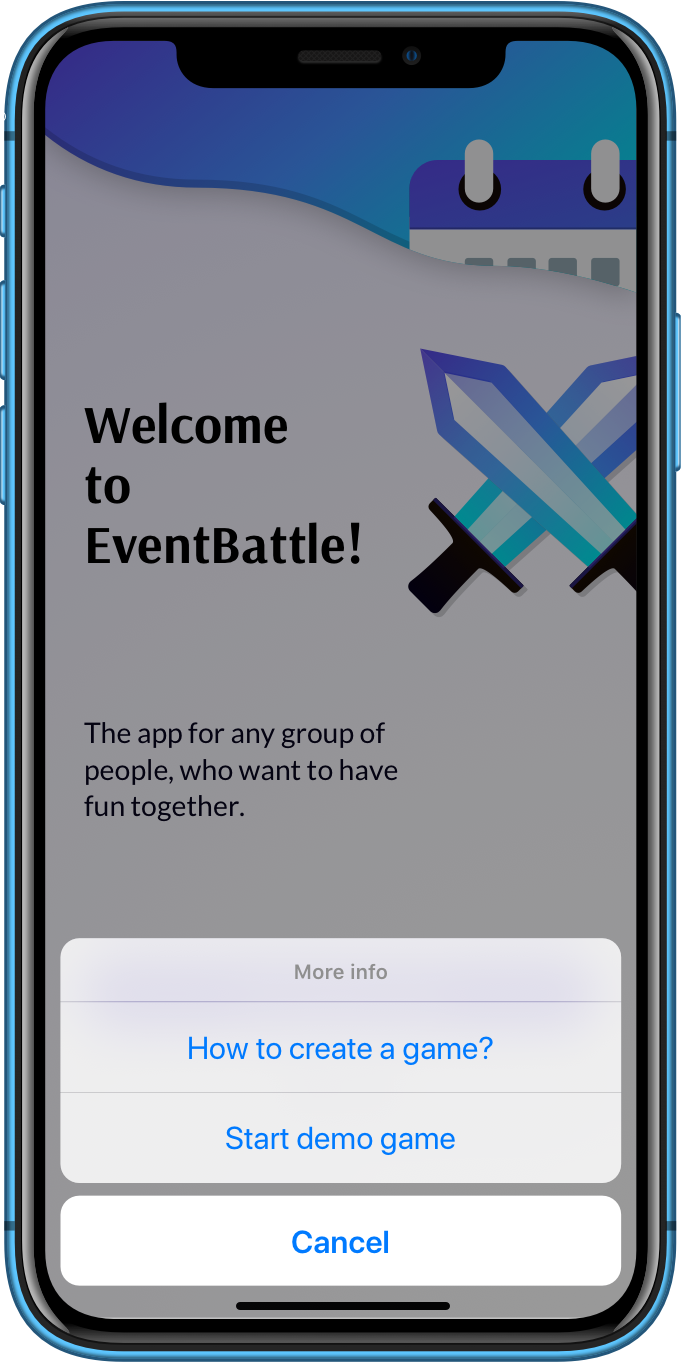
EventBattle demo game preview on mobile phone

The demo game lets you explore the EventBattle mobile app.

  • Download the app from the store
  • Click on the More info button
  • Click on the Start demo game button
  • 👍 Enjoy discovering

The tasks here are exemplary. When you create your own game, you can customize tasks in the web administration.